AI
Forward-Deployed AI PMs Are Changing How Products Get Built
8 min readJun 9, 2026
13 min left
0% read
The best AI products aren't the ones that make the most LLM calls, they're the ones that make the fewest calls needed to get the job done. A breakdown of the loop patterns behind production AI products, what they actually cost in tokens, and how to keep them efficient at scale.
Every week there's a new model, and almost all the noise is about which one's smartest. But after building AI products for a while, I keep landing on the same thing: the model rarely makes or breaks the product. The loop around it does. And that loop is where your costs live too.
A single prompt gives you an answer. A loop pulls context, calls a tool, checks its own work, and hands back something you can trust. That's the difference between a demo and a product. But every one of those extra steps moves tokens around, and every token has a price. At a hundred requests you'll never notice. At a million, loop design is your infra bill.
So this post is about one thing: how to build loops that stay cheap and fast without getting dumber. Not the theory of agents. The economics of them.
Before the loop, one word you need: a token. Models don't read words, they read tokens, which are chunks of text roughly three-quarters of a word each. You pay per token, both for what you send in and what the model sends back. That's the whole reason cost enters this conversation at all. Every step in a loop moves tokens around, and every token has a price.
Now, the loop itself. Most people picture AI working like this:
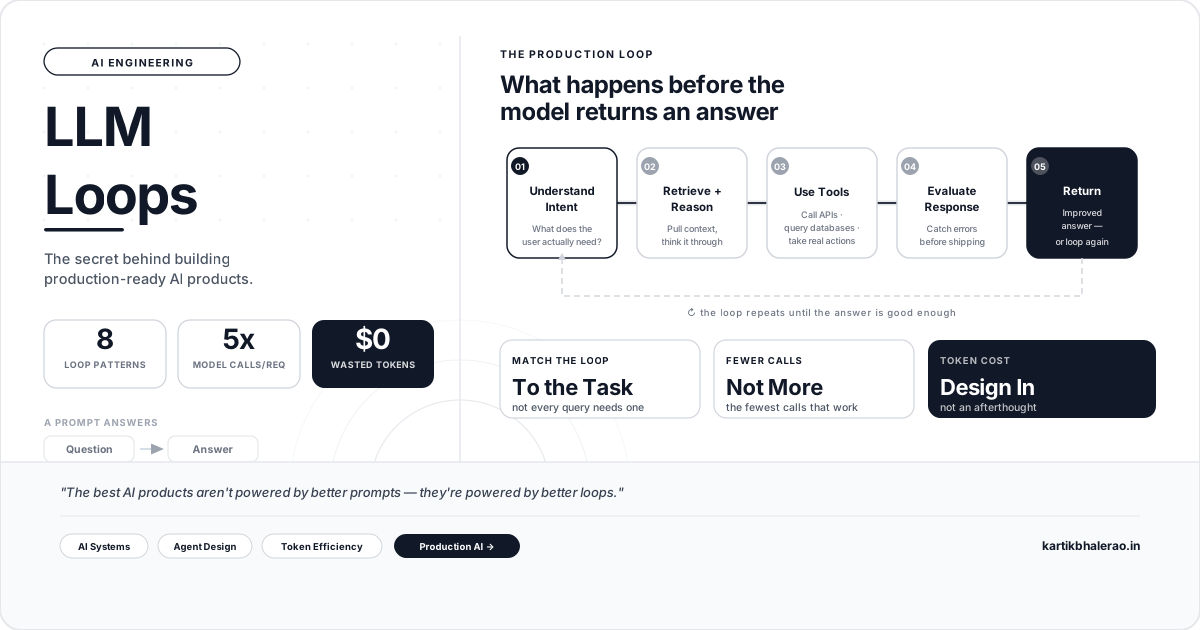
Real products look more like this: input comes in, the system understands intent, pulls context, reasons, uses a tool if it needs to, checks the output, and only then returns an answer.
Instead of answering the instant you ask, the system gathers, reasons, and refines before it responds. That cycle is the loop, and pretty much everything good about a production AI product comes from how well that loop is built.
In plain terms: an LLM loop is the repeatable cycle a product runs every time it needs to answer something, take the input, gather whatever context or tools are needed, let the model reason, check the result, and only then respond, going around again if the check fails. It's used in pretty much every serious AI product, from a chatbot to a coding agent, because it's what turns a single guess into a checked, grounded answer. Here's the shape to keep in your head. Not every product runs all of these steps, and the good ones skip the steps a given request doesn't need.
The arrow looping back is the important bit. When the check fails, the system goes around again instead of shipping something wrong. That single feedback edge is what separates a loop from a straight line.
Don't think of loop patterns as a menu to collect. Each one buys you something, usually accuracy or capability, and pays for it in tokens and time. Here's the quick version, cheapest to most expensive:
The pattern underneath: the fancier the loop, the more it costs. That's not a reason to avoid the fancy ones. It's a reason to only reach for them when the task earns it.
Here's the same set of trade-offs broken out in full, what each loop does and where it earns its keep.
The multi-agent loop is the one people picture least clearly, so here's what "several agents hand work off to each other" actually looks like when it's two LLMs: one drafts, the other checks. They keep trading until the second one is satisfied.
Notice there's no orchestrator handing out instructions here, agent A doesn't know or care that B exists as a "manager." B just reads A's output and responds with either more work or a pass. That's the whole pattern: two separate model calls, a shared piece of context passed between them, and a stop condition. Scale that to five specialized agents and you have the same loop, just with more handoffs and more tokens per request, which is exactly why section 3 called this the most expensive pattern on the list.
One more thing worth planning for: what happens when a step fails. Tool calls time out. Retrieval comes back with junk. A good loop has a fallback for each step, retry once, fall back to a cheaper path, or hand off to a human, instead of crashing or hallucinating its way forward. If you haven't decided what happens on failure, you haven't finished designing the loop.
Let's put real numbers on it, because "tokens are expensive" means nothing without them.
Here are current per-million-token rates for one popular model family (input / output):
| Model | Input | Output |
|---|---|---|
| Small (fast, cheap) | $1 | $5 |
| Mid (balanced) | $3 | $15 |
| Large (most capable) | $5 | $25 |
Two things to notice. Output costs five times input across the board, so long, chatty responses hurt more than long prompts. And the large model is five times the small one, so reaching for it by default is a choice you're paying for on every single call.
Now the part that matters, the same user request run two ways.
None of that came from a smarter model or a magic trick. It came from routing the easy part to a cheap model, sending less context, and caching the stuff that never changes.
⚠️ Rates above are current as of mid-2026 and are illustrative round numbers. Check your provider's live pricing before you quote figures.
The right architecture depends far less on what's technically possible and far more on where your company is.
Startups: ship fast. Your job is to find out if anyone wants this thing. That's it. Start with a think loop and maybe a basic tool loop, and nothing else. No multi-agent system, no elaborate retrieval. Every hour you spend on orchestration is an hour you're not spending learning whether the problem is real. Keep it cheap and keep it simple, because most of what you build now you'll throw away anyway. A support widget that only answers FAQs is a pure think loop, no retrieval needed until users start asking about their own order status.
Mid-scale: get smarter without getting complicated. Once people are actually using the product, the cracks show: stale answers get retrieval, shaky output gets a reflection pass, repeated questions get memory. This is the sweet spot for most products.
A concrete example: my competitive intelligence pipeline scrapes competitor activity, runs it through an LLM, and pushes summaries into Notion and Slack via n8n. It's three loops stacked up: a tool loop to scrape, a think loop to summarize, a light reflection pass to flag what matters. No multi-agent, because it doesn't need it.
The first version fed full scraped pages straight into the model and let it wade through the noise. The fix was boring: filter with plain code first, summarize in one pass instead of rewriting, and only run the "is this important" check on items that already cleared a basic bar. Same output, a fraction of the tokens.
Large-scale: trust and control. At enterprise volume the requirements flip. Now it's about accuracy, compliance, security, and being able to explain what happened after the fact. The stack gets deeper: authentication, enterprise search, policy checks, tool calls, reflection, human approval on the high-risk stuff, plus monitoring and evaluation running underneath it all. Think claims processing at an insurer: intake, policy lookup, fraud check, and approval are each logged and reviewable, because a regulator will eventually ask for the trail. And because volume is huge, every efficiency lever from the last section pays off enormously here. Enterprise AI is about trust, not raw intelligence.
Everything that made the optimized loop cheap comes down to a handful of moves:
Most of those moves have a tool category built to help. Treat these as starting points, not endorsements, and check what's current before you commit, because the space moves fast.
You can't improve what you don't watch. Four numbers tell you almost everything:
Here's the reframe that ties them together: measure cost per successful outcome, not per call. A cheap call that returns a wrong answer and forces the user to try again is more expensive than one good call that costs three times as much. If you only track spend per call, you'll optimize toward a product that's cheap and useless. Track it per resolved request and the incentives line up with quality.
Tracking cost sounds abstract until you know where the numbers actually live. There are three levels, cheapest to most thorough, and most products want all three eventually.
Straight from the API response. Every call returns a usage object with exact token counts. You don't estimate anything, this is ground truth. Log that on every call and you know precisely what each request cost. This is the raw truth.
Your provider's console. Anthropic, OpenAI, and the rest all have a usage dashboard showing tokens and spend by day and by model. Zero setup, good for "what did last week cost." Useless for "which feature is burning it," because it can't see inside your product. This is the monthly bill.
An observability tool. This is the one that answers "where is the money going." Langfuse or Helicone sit between your app and the model and log every call with tokens, cost, latency, and which part of your product triggered it. Helicone is the fastest to wire in, you basically change your base URL. Then you can slice cost by user, by endpoint, by loop step. This is the itemized breakdown.
If you want one rule to screenshot: start with the simplest loop that could possibly work, and only add a step when a real problem forces you to.
In practice that means:
Every arrow points from cheap and simple toward expensive and complex. Walk that path one step at a time, and stop the moment the product is good enough.
The same mistakes come up again and again:
What ties them together is that each one adds complexity that hurts quality and cost at the same time.
Models keep getting better, and that was never the bottleneck. How we orchestrate them is.
A great AI product isn't measured only by how smart it is. It's measured by how efficiently it delivers that intelligence. The teams that win are the ones that retrieve the right thing, use tools instead of guessing, add reflection only where it pays off, and keep the loop as lean as the task will allow.
So if you're building something, stop tuning the prompt in isolation. Design the loop. Then design it to be cheap. That's where production-ready AI actually gets built.
If you want a starting point, go pull the usage numbers off your own last hundred requests before you read anything else on this topic. You'll know within five minutes whether your loop is the lean kind or the expensive kind.
An LLM loop is the repeatable cycle a product runs every time it needs to answer something: take the input, gather whatever context or tools are needed, let the model reason, check the result, and only then respond — going around again if the check fails. It's what turns a single guess into a checked, grounded answer.
A think loop — the model reasons and answers immediately with no retrieval and no tools. It's basically free and fine for FAQs and writing help. Most products should start here, and a lot should stay here.
The model rarely makes or breaks an AI product — the loop around it does, and that loop is where the cost lives too. At a hundred requests you'll never notice the difference; at a million, loop design is your infra bill.
In the worked example in this post, routing the easy part to a cheap model, trimming context, and caching the stable system prompt took a four-call naive loop from about $0.26 per request down to about $0.03 — roughly 9x cheaper for the same output.
Cost per successful outcome, not cost per call. A cheap call that returns a wrong answer and forces a retry is more expensive than one good call that costs three times as much.
Similar Topics