AI
Loops Engineering for Product Development: How to Increase AI Efficiency
13 min readJul 26, 2026
8 min left
0% read
Stop manually checking G2, pricing pages, and app store reviews every week. Here's how I built a system using Apify, Notion, Claude, and Slack that delivers competitor signals automatically — with AI analysis included.
Identifying
The Problem
Most PMs do competitive research the same way: open a browser, manually check 5 competitor pages, copy-paste into a doc, try to remember what changed from last month. It's time-consuming, inconsistent, and completely reactive.
By the time you notice a competitor's pricing change or a surge in negative reviews, the window to respond has already passed.

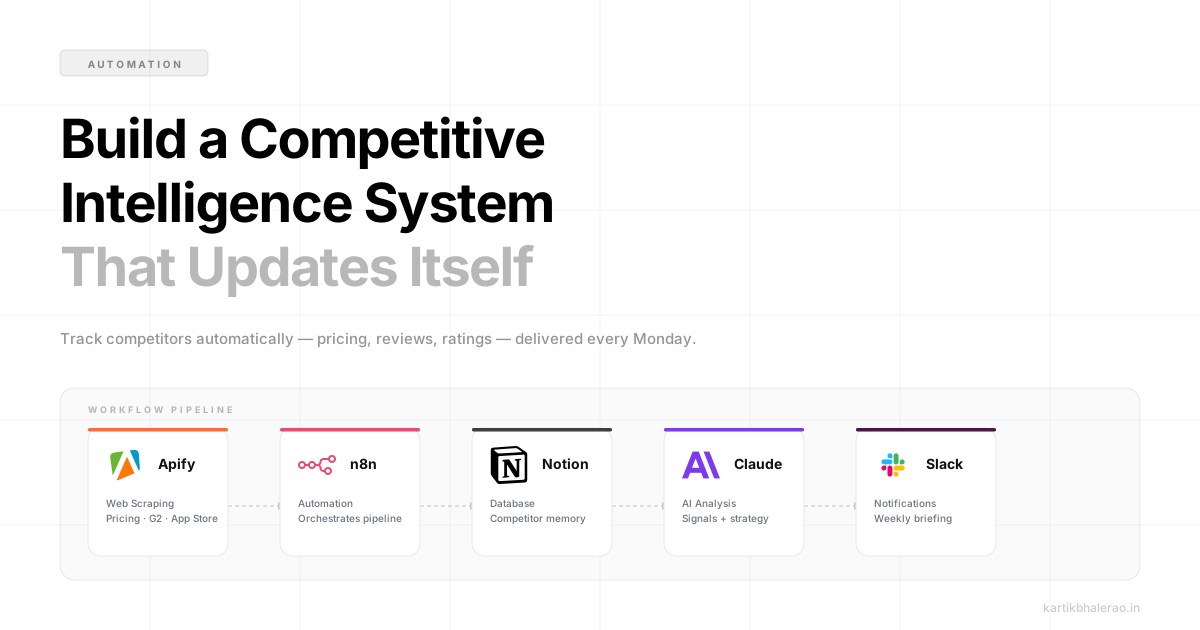
Apify
Web Scraping

Notion
Database

Claude API
AI Analysis

Slack
Notifications

n8n / Zapier
Automation
At a glance
I spent about a weekend building a lightweight system that now runs every Monday morning and drops a clean summary into our team's Slack channel, automatically. It tracks pricing page changes, scrapes new G2/Capterra reviews, monitors app store ratings, and uses Claude to synthesize everything into actionable signals.
Here's exactly how to build it, step by step.
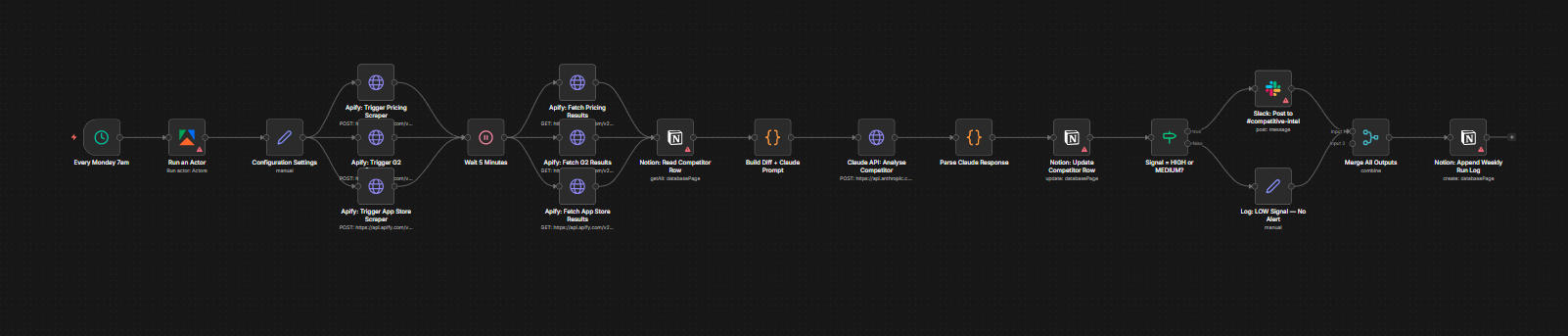
Before diving into the setup, here's the full flow at a glance:
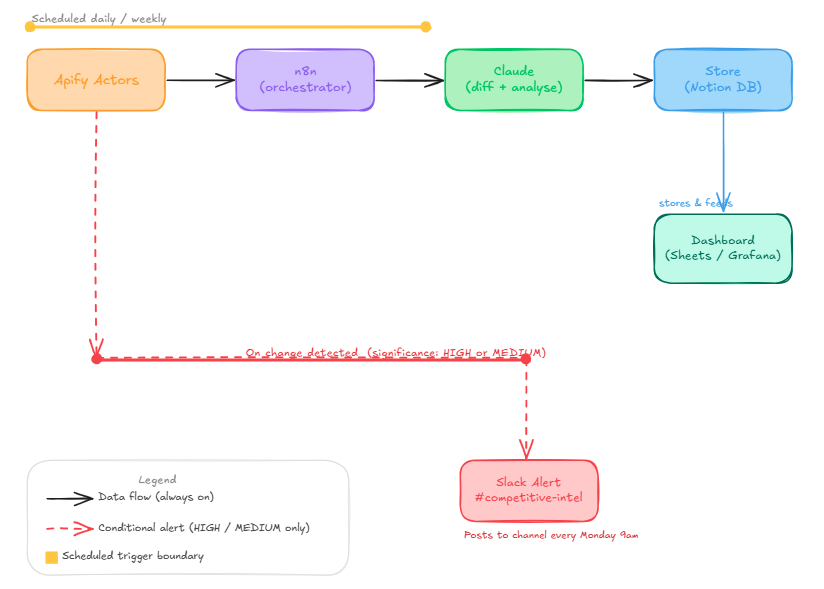
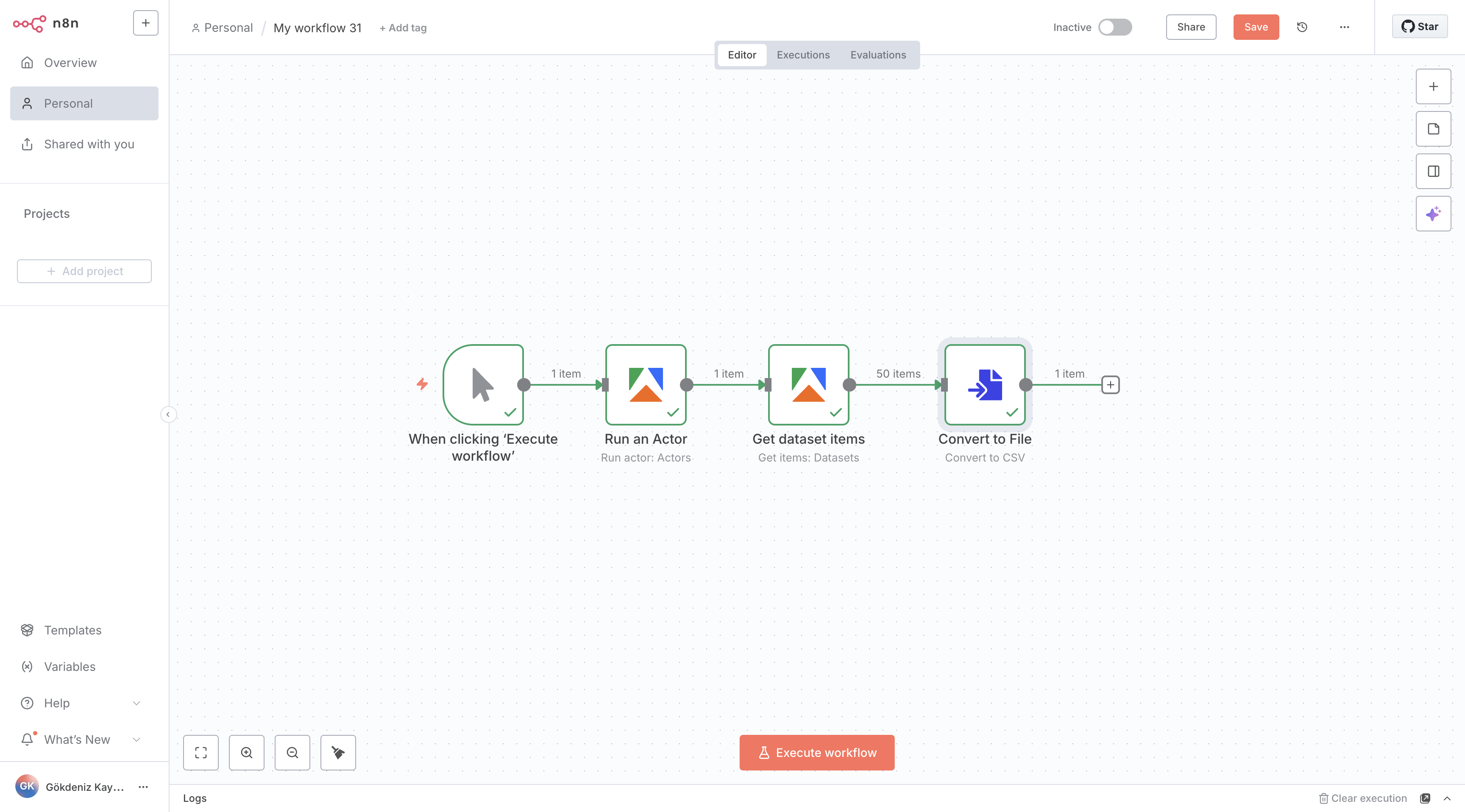
Apify has a marketplace of pre-built actors, so you don't need to write scrapers from scratch. For competitive intelligence, I use three:
Configure each actor with your list of competitor URLs and set the schedule to weekly (every Monday at 7am, so the data is ready before your Slack post at 9am). In the actor output settings, enable Dataset export as JSON.
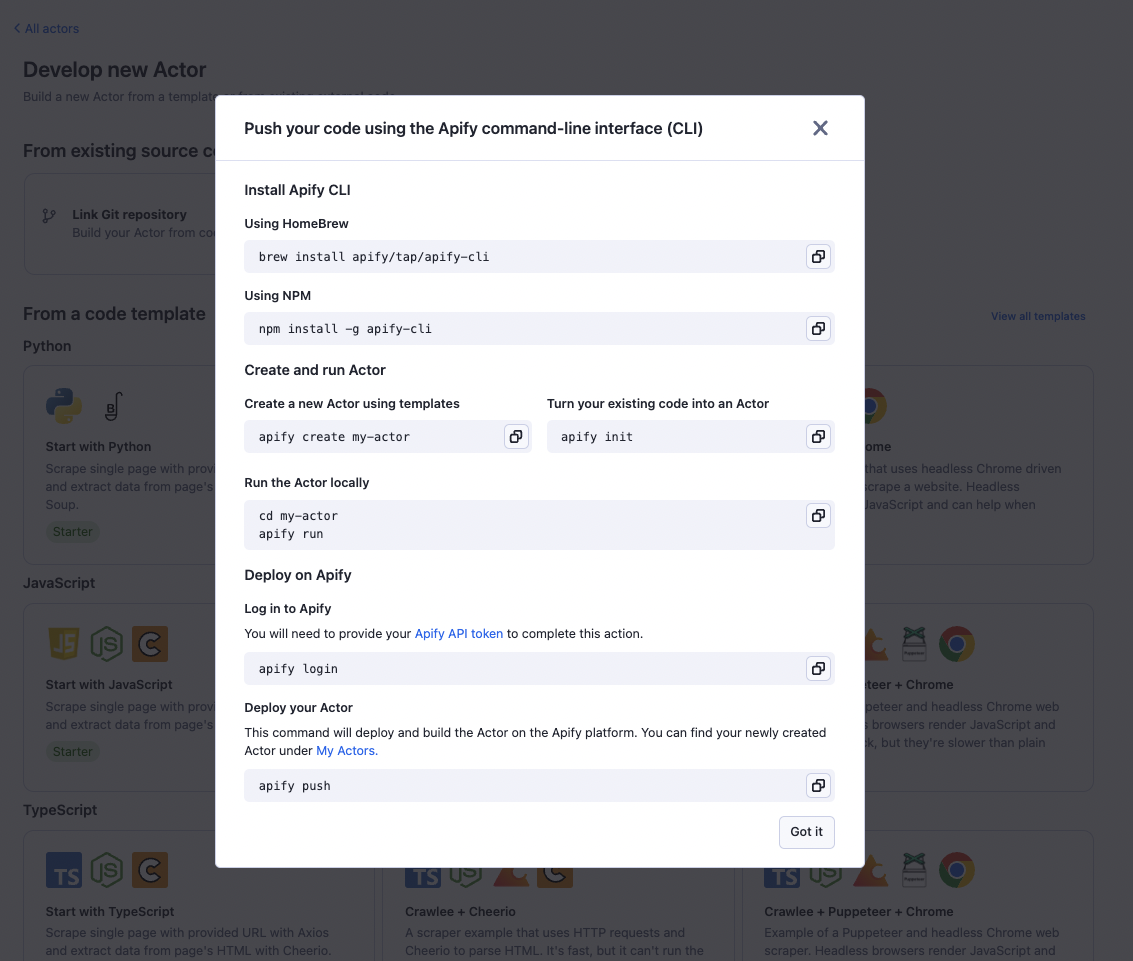
Once an Apify run completes, use the Apify API to fetch the dataset:
# Fetch latest dataset run from Apify
GET https://api.apify.com/v2/acts/{actorId}/runs/last/dataset/items
    ?token={YOUR_APIFY_TOKEN}
    &format=json
    &limit=50
Notion serves as the long-term memory of your system. Each row = one competitor. Each week, the automation updates the row with the latest scraped data, which lets you diff against last week's values.
The database is divided into 3 sections:
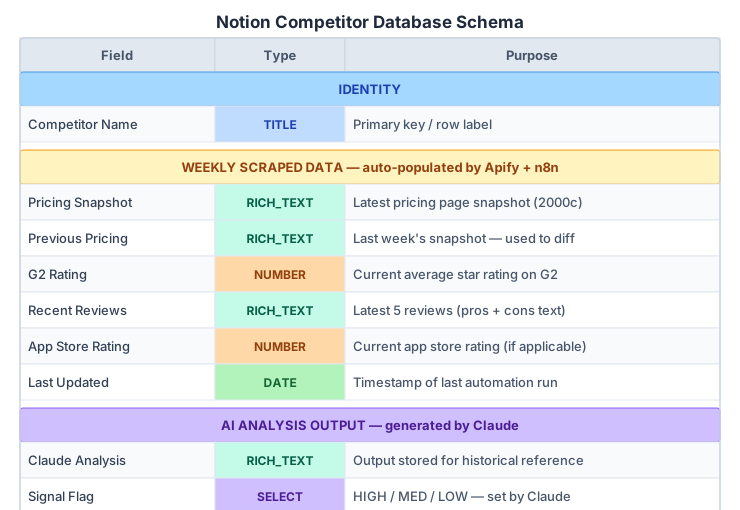
In your n8n workflow, after fetching from Apify, use the Notion node to read each competitor's current record, write the existing Pricing Snapshot into Previous Pricing, then update Pricing Snapshot with the new scrape. This gives you a clean before/after pair to send to Claude.
This is where the system gets genuinely useful. Instead of dumping raw scraped text into Slack, you send Claude a structured prompt with the before/after data and ask it to identify what actually matters.
You are a competitive intelligence analyst for a B2B SaaS product manager.
You will be given weekly scraped data about a competitor.
Your job is to identify changes that have strategic significance.

Return your analysis in this exact format:
1. SIGNAL LEVEL: [HIGH / MEDIUM / LOW]
2. KEY CHANGES: Bullet list of concrete changes detected (max 4)
3. STRATEGIC IMPLICATION: 2–3 sentences on what this means for our product
4. SUGGESTED ACTION: One specific thing the PM team should do this week

Be concise. Skip anything that didn't change. If nothing meaningful changed, say so clearly.
## Competitor: {{competitor_name}}

### Previous Pricing Page (last week):
{{previous_pricing}}

### Current Pricing Page (this week):
{{current_pricing}}

### G2 Rating Change:
{{prev_g2_rating}} → {{current_g2_rating}}

### Recent Customer Reviews:
{{recent_reviews}}
{
  "method": "POST",
  "url": "https://api.anthropic.com/v1/messages",
  "headers": {
    "x-api-key": "{{$credentials.claudeApiKey}}",
    "anthropic-version": "2023-06-01",
    "content-type": "application/json"
  },
  "body": {
    "model": "claude-sonnet-4-20250514",
    "max_tokens": 600,
    "system": "{{systemPrompt}}",
    "messages": [
      {
        "role": "user",
        "content": "{{userMessage}}"
      }
    ]
  }
}
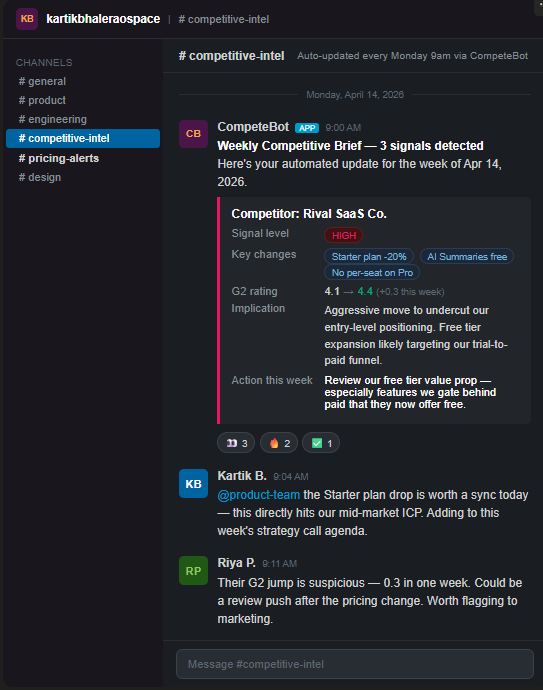
Claude's output gets assembled into a clean Slack message using Block Kit. Here's what the Slack Block Kit payload looks like:
{
  "text": "🔴 Weekly Competitive Brief, 3 signals detected",
  "blocks": [
    {
      "type": "section",
      "text": {
        "type": "mrkdwn",
        "text": "🏢 *Competitor:* Rival SaaS Co.\n📊 *Change:* Dropped Starter plan price by 20% · Added AI Summaries to free tier\n⚡ *Significance:* High\n💡 *Action:* Review our free tier value prop, especially features we gate behind paid that they now offer free"
      }
    }
  ]
}
Example output in #competitive-intel:
CompeteBot [APP]  Monday 9:00 AM
─────────────────────────────────────────────
🔴 Weekly Competitive Brief, 3 signals detected

│ Competitor: Rival SaaS Co.
│ Signal Level: 🔴 HIGH
│ Key Changes: Dropped Starter plan price by 20% · Added "AI Summaries"
│              to free tier · Removed per-seat pricing on Pro
│ Implication: Aggressive move to undercut our entry-level positioning.
│              Free tier expansion likely targeting our trial-to-paid funnel.
│ Suggested Action: Review our free tier value prop this week.
In n8n, use the Slack node with a chat.postMessage action. Map Claude's SIGNAL LEVEL output to an emoji flag (🔴 HIGH, 🟡 MEDIUM, 🟢 LOW) to make it scannable at a glance.
Total build time: about 4–6 hours the first time. Once it's running, it's zero maintenance unless a competitor site changes its HTML structure significantly (which Apify usually handles automatically anyway).
More importantly, it changes how your team thinks about competition. When intel is delivered to you instead of requiring active effort, strategy conversations stop starting from "I think our competitor did something last month" and start from "here's exactly what changed this week and here's what it means."
The best competitive intelligence systems aren't the most comprehensive ones, they're the ones that actually get read. A crisp, weekly Slack briefing that takes 90 seconds to consume will always beat a 40-page competitive deck that gets opened once a quarter.
Build the system that makes it easy to stay informed, and your team's competitive awareness will compound over time without anyone having to make a conscious effort to maintain it.
Similar Topics